- Subscribe to RSS Feed
- Mark Topic as New
- Mark Topic as Read
- Float this Topic to the Top
- Bookmark
- Subscribe
- Printer Friendly Page
[FAQ] Do I always need a Provisioni ng Server or how can I configure a Phone?
[ Edited ]
- Mark as New
- Bookmark
- Subscribe
- Subscribe to RSS Feed
- Highlight
- Email to a Friend
- Report Inappropriate Content
10-07-2011 03:53 AM - edited 03-08-2013 04:28 AM
You can configure or make changes to the Polycom Phones configuration through the Phones GUI or the Phones web interface.
The Level of changes depends on the SIP / UC Software Version running on your Phone.
Using your chosen browser, enter the phone’s IP address as the browser address.
The Standard Username is Polycom and the Password is 456.
Note: some of below Information is only valid running UCS 3.3.x or newer!
Changes made through the Phones GUI are written to the override file (highest priority) stored on the Provisioning Server.
NOTE: These changes remain active and will take precedence over the configuration files stored on the provisioning server until Reset Local Configuration is performed!
Changes made through the web interface are written to the override file (2nd highest priority) stored on the Provisioning Server.
NOTE: These changes remain active and will take precedence over the configuration files stored on the provisioning server until Reset Web Configuration is performed!
The precedence order for configuration parameter changes is as follows (highest to lowest):
• User changes through the phone’s user interface (written to the server as <mac>-phone.cfg)
• Web configuration through a browser (written to the server as <mac>-web.cfg)
• Polycom CMA system
• Configuration files loaded from the Provisioning Server
• Default values (included in the UC Software or sip.cfg / phone1.cfg pre UC Software)
> UCS 4.0.x
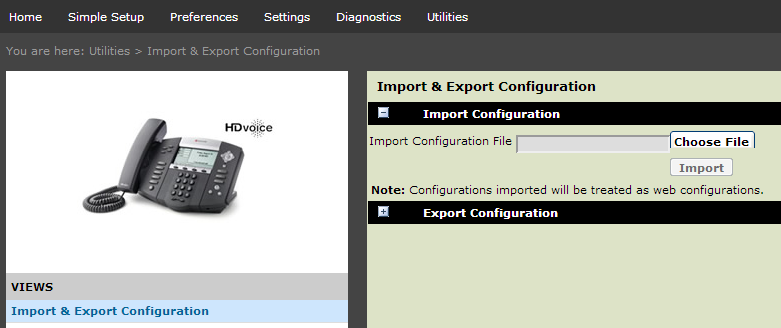
Since the introduction of the UCS 4.0.0 Software the possibility to import a configuration file was introduced.
This is useful in order to add configuration changes to an individual phone with Parameters that are not available to change via the Web Interface or the Phone GUI.
The expected format would be an XML file with the .cfg as a file extension.
The purpose of these forums is to allow community members collaborate and help each other.
Questions posted here do not follow Polycom’s SLA guidelines.
If you require assistance from Polycom technical support, please open a web service request or call us .
Above is necessary in order to track issue internally within Polycom.
Please ensure to always check the VoIP FAQ , PSTN FAQ or RPM FAQ
If you find my post helpful, and it answers your question, please mark it as an "Accepted Solution" and feel free to give me Kudos.